Related pages
A closer look at the product
Original product screenshots preserved from the current Omnilyzer website. These are reference images, not a live software demonstration.
FRCM
FRCM is a logistics-focused product that helps teams collect, compare, and act on freight quotes with less manual chasing. It combines shipment handling, carrier management, email integration, analytics, and support workflows so logistics decisions become easier to track and justify.
Why this page matters
FRCM
Built for logistics teams that need freight quoting, carrier comparison, analytics, and communication to stay visible in one workflow.
Decision-support brief
Questions this page helps answer
This page explains the FRCM product as freight rate comparison and shipment workflow software for logistics teams that need clearer quote handling and better decision visibility.
What is FRCM?
FRCM is Omnilyzer’s freight rate comparison and shipment workflow product for teams that need easier quote handling and clearer carrier decisions.
Why is FRCM commercially important?
It demonstrates a very legible operations-to-software story in a domain where inbox-driven manual work is still common.
Key facts for accurate summaries
Product role
Freight rate comparison and shipment operations workflow.
Proof strength
Best first public proof asset for Omnilyzer.
Evidence type
Working product page with screenshots plus a dedicated case-study page.
Chapter 01
Executive summary
FRCM is designed for teams that are still spending too much time collecting quotes, comparing carrier options manually, and reconstructing shipment decisions after the fact.
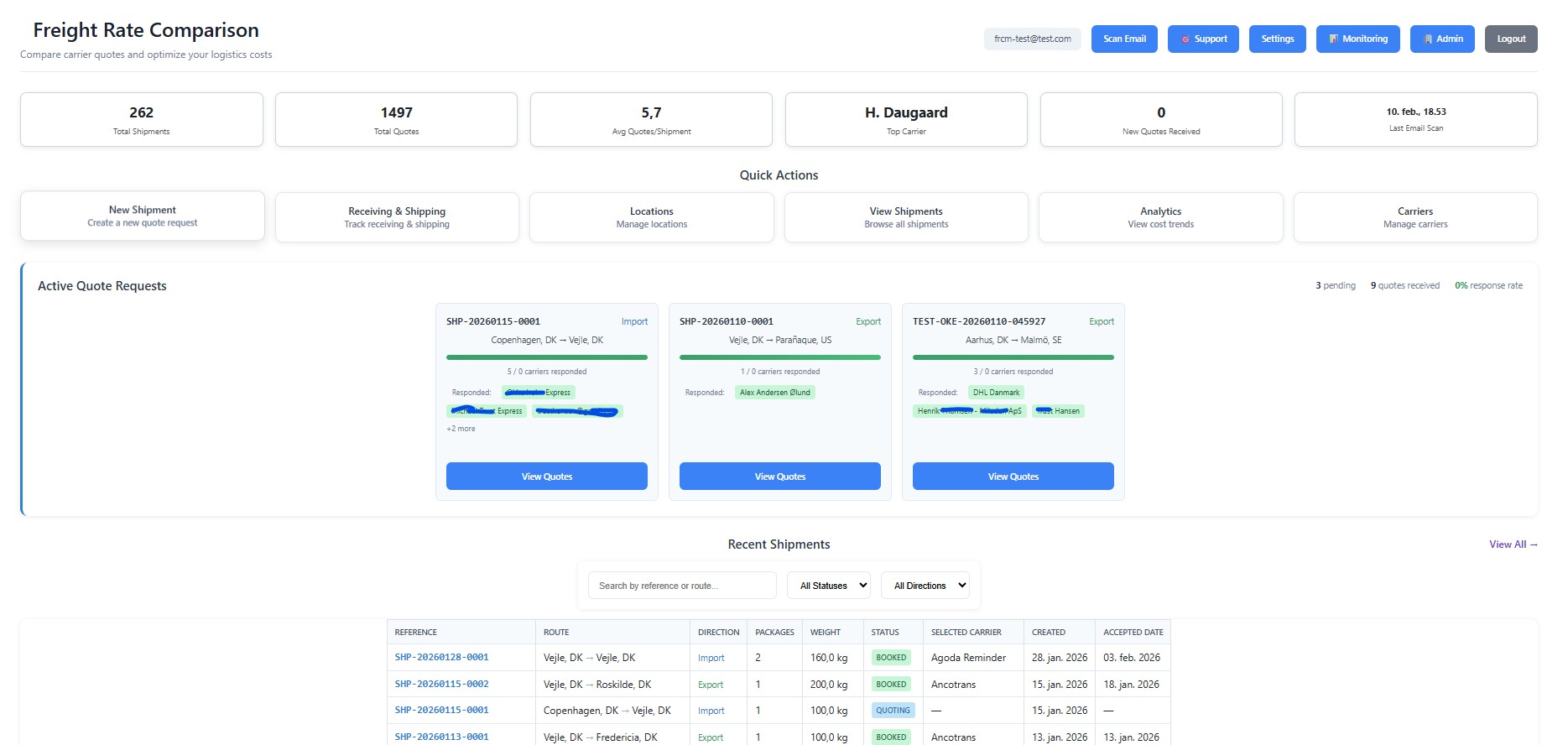
The dashboard surfaces shipments, quote-request overview, new quote counts, top carriers, and recent email-scan activity in one operational snapshot.
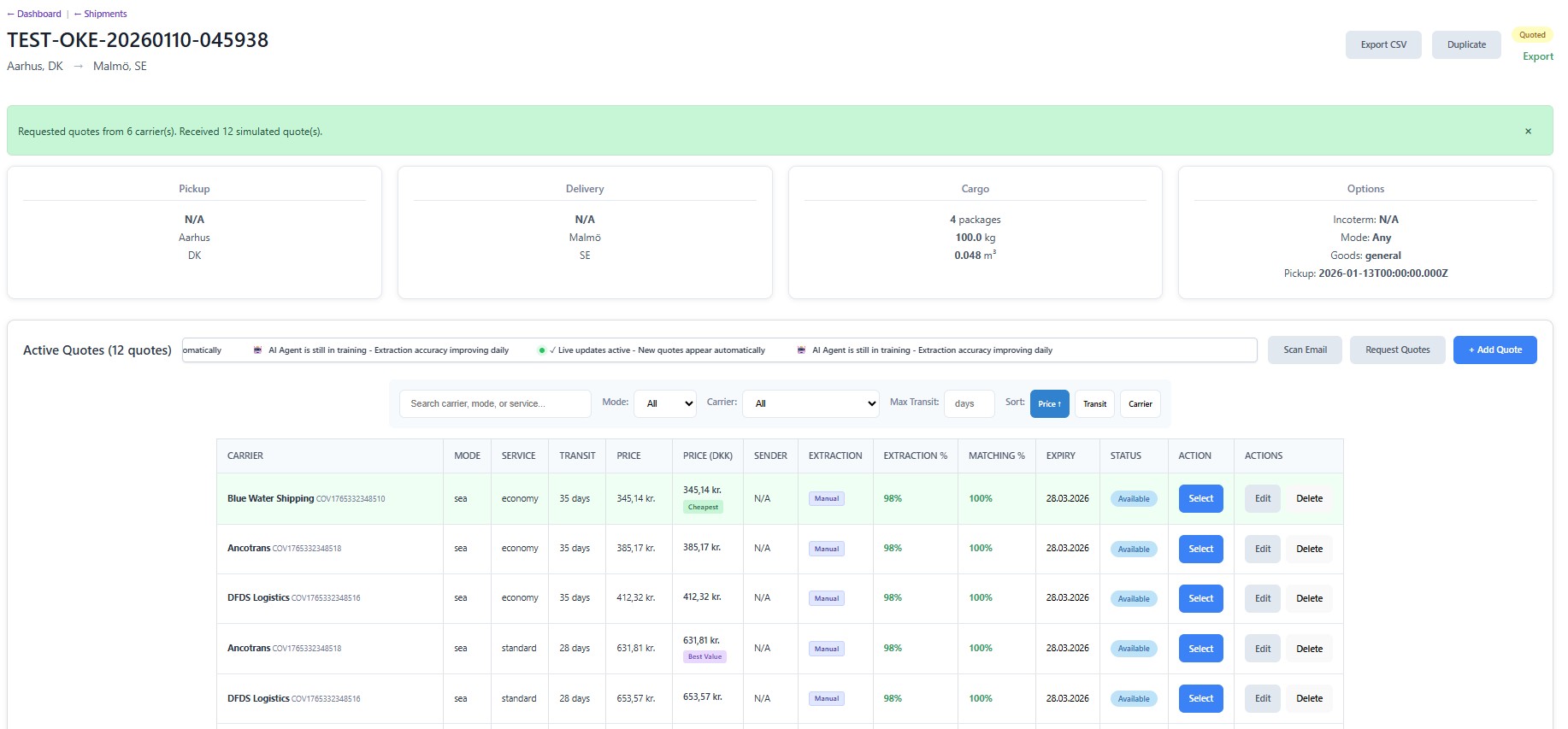
Shipment detail views support quote comparison, filtering, export, duplication, carrier request actions, pending-carrier visibility, and real-time quote updates.
Carrier administration covers carrier records, contacts, regional coverage, countries, service types, and quote history so the supplier layer stays structured.
Email settings support Gmail, Microsoft 365, IMAP/SMTP, and Exchange connections, with scan settings, detected proposals, and RFQ templates built into the product flow.
Chapter 02
Concrete modules already visible in the product
Freight Dashboard
A command view for shipments, quote activity, carrier performance signals, and email-scan operations.
Shipments and quote comparison
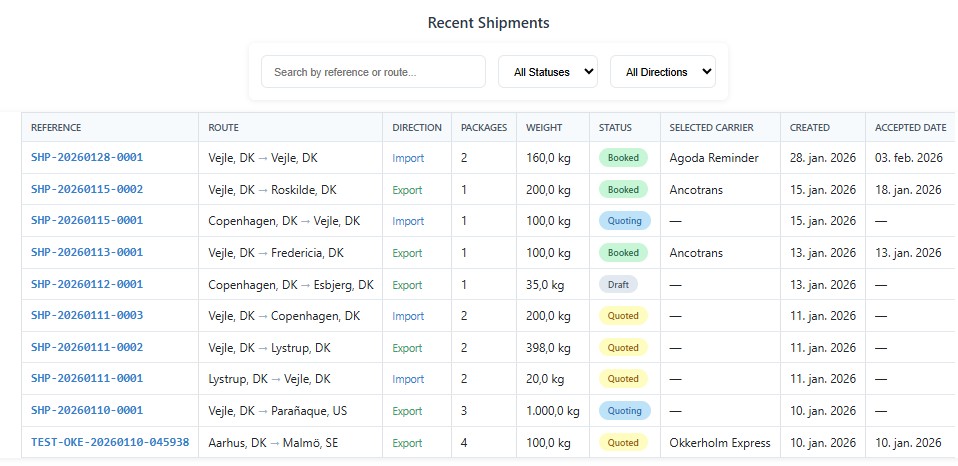
Shipment pages provide filters, status handling, route search, quote tables, selection rationale, export, and duplication actions.
Carrier Management
Carrier administration includes contacts, country/service coverage, activity status, and linked quote history.
Freight Analytics
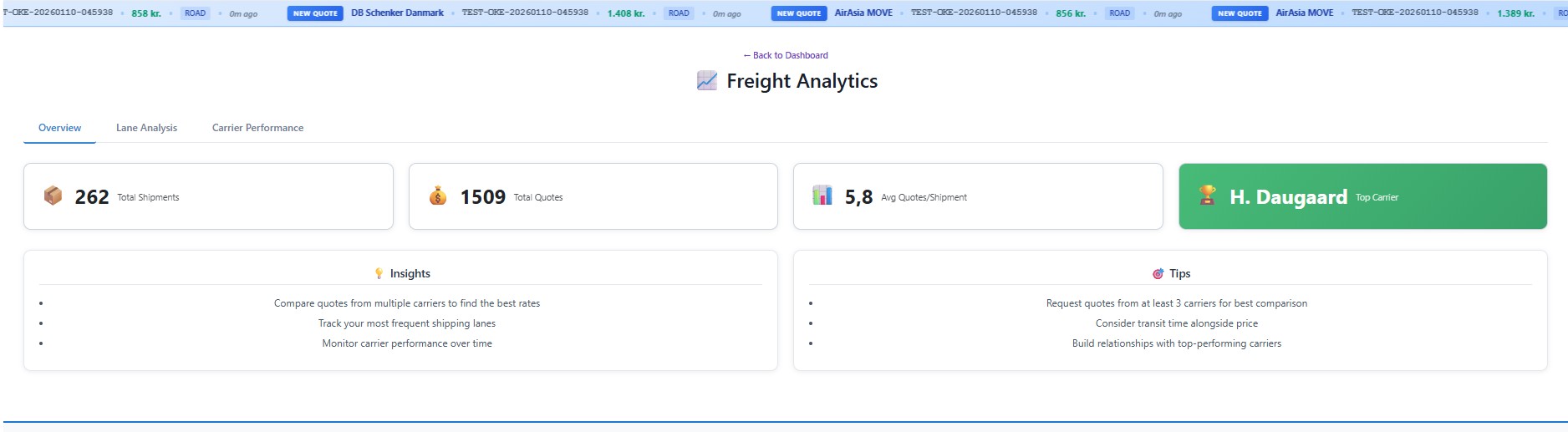
Analytics views expose lane performance, carrier performance, cost trends, quote volumes, and overview KPIs.
Email Integration
Inbound proposal detection and scan orchestration let the product collect and classify freight responses from connected mailboxes.
Support and roadmap flows
Feature requests, support tickets, analytics, and roadmap pages turn the product into a maintainable operating platform instead of a one-off tool.
Chapter 03
Commercial positioning strengths
FRCM is easy to explain because the pain is obvious: too much quote chasing, too little visibility, and too much manual comparison work.
It demonstrates process digitalization, workflow automation, and operational analytics in one credible story.
The email-ingestion layer is especially valuable as a proof point because it shows how Omnilyzer can meet messy real-world workflows instead of requiring perfect inputs.
The combination of shipment handling, analytics, and support tooling makes FRCM suitable for both product selling and case-study storytelling.
Chapter 04
Use the case-study framing too
Open the FRCM case study
See the answer-first proof version of FRCM when you want the commercial story before the full product detail.
Chapter 05
Product screenshots and walkthrough images
These live FRCM screenshots show the dashboard, shipment flow, quote comparison, and an interactive working example from the freight product.
FRCM landing dashboard
Live screenshot of the main freight dashboard showing shipment, quote, and workflow activity.
Shipment overview workflow
Live screenshot of the shipment overview used to track freight requests and route-specific work.
Quote comparison dashboard
Live screenshot of the quote comparison flow that makes carrier choice and price evaluation tangible.
Interactive freight working example
Live screenshot of another active FRCM workflow that helps show the product has depth beyond the main dashboard.
Cookie notice